Nginx Proxy Manager
Setup
- Create a docker network
docker network create scoobydoo
- Create a docker-compose.yml file
services:
  npm:
    image: jc21/nginx-proxy-manager:latest
    restart: unless-stopped
    ports:
      - 80:80
      - 81:81
      - 443:443
    volumes:
      - ./data:/data
      - ./letsencrypt:/etc/letsencrypt
    healthcheck:
      test: ['CMD', '/bin/check-health']
      interval: 10s
      timeout: 3s

networks:
  default:
    external: true
    name: scoobydoo
- Start the container
docker-compose up -d
- Open the web interface
http://localhost:81
- If you are using headless server, you can use SSH tunneling
ssh -L 8181:localhost:81 user@server
Then open the web interface
http://localhost:8181
- Login with the default credentials and change the password
Email: admin@example.com
Password: changeme
Set Reverse Proxy For NginxProxyManager
-
Go to Hosts -> Proxy Hosts -> Add Proxy Host
-
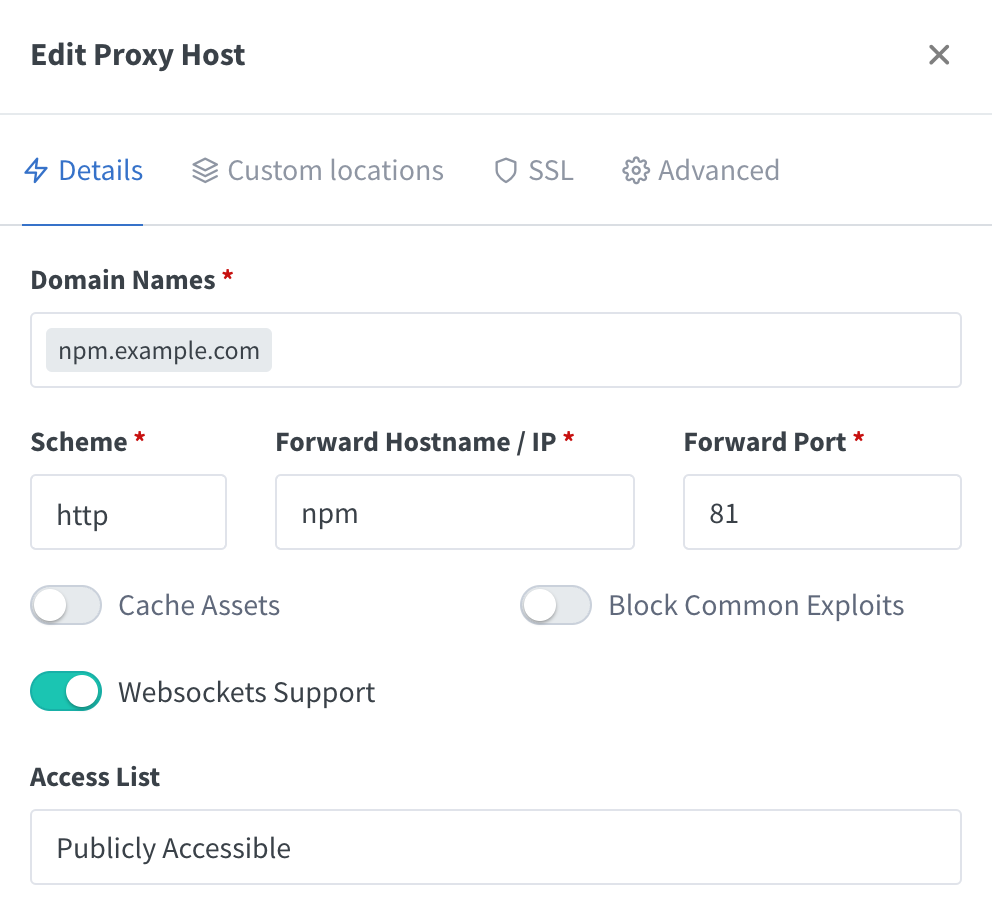
Fill in the form
Domain Names: npm.example.com
Scheme: http
Forward Hostname / IP: npm
Forward Port: 81
- Remove the default port
81from docker-compose.yml
services:
  npm:
    image: jc21/nginx-proxy-manager:latest
    restart: unless-stopped
    ports:
      - 80:80
      - 443:443
    volumes:
      - ./data:/data
      - ./letsencrypt:/etc/letsencrypt
    healthcheck:
      test: ['CMD', '/bin/check-health']
      interval: 10s
      timeout: 3s

networks:
  default:
    external: true
    name: scoobydoo
- Restart the container
docker-compose down && docker-compose up -d
- Now if you go to npm.example.com you will see the NginxProxyManager web interface